


CrispTone: Offline Music
4.233.00 Reviews
App Specs
- Version
- 1.1.2
- Updated On
- License
- Free
- Downloads
- 1,000,000+
- Developer
- Technology Hub Pro
- Categories
- Music & Audio
- Platform
- Android
Screenshots
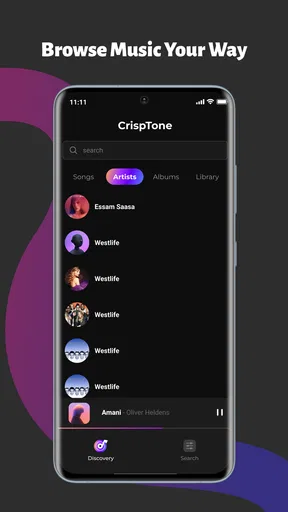
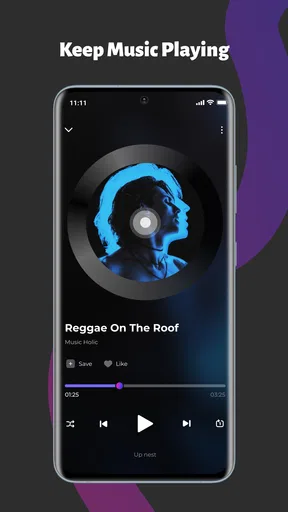
 Analysis by AppCompare
I like music apps that stay out of the way. When I already have audio files on my phone, I do not want to build another streaming library, manage another subscription, or depend on a signal that may disappear on a train or during a flight. CrispTone: Offline Music takes that simpler route. It is a free music and audio app from Technology Hub Pro, built around local playback, playlists, equalizer controls, and background listening.
After spending time with it, my impression is straightforward: this is a practical player for people who already own their music and want a cleaner way to listen to it. It is not trying to replace a streaming service, music discovery platform, or cloud library. That focus is its biggest strength, but it also defines the situations where I would choose something else.
The app has reached a 4.3 average from around 1.2 thousand ratings and has passed one million installs, which suggests that its basic approach is connecting with a sizeable audience. It is rated for Everyone, works from Android 8.0 onward, and the current release is version 1.0.6. Those details make it accessible to older phones as well as newer devices, although the experience still depends heavily on how neatly your local music collection is organized.
How CrispTone feels in everyday use
I find CrispTone most useful when a phone is shared for a practical reason, such as taking turns choosing music for a car ride or letting someone borrow a device during a trip. Its local-file focus keeps the listening routine centered on audio already on that phone, so a household can make a few playlists for common situations without treating them as a shared online library. That distinction is worth keeping in mind as I consider how to set up the app on a device with more than one user.
A focused player for music already stored on your phone
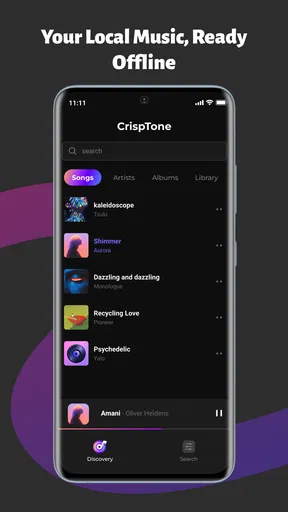
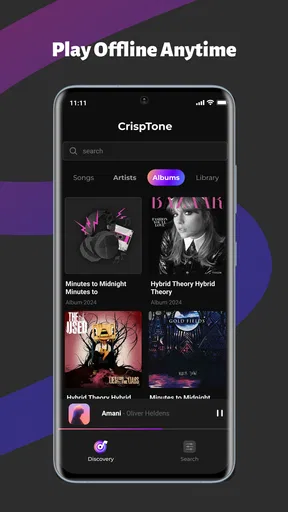
The first thing I noticed is that CrispTone makes sense only if local audio matters to you. The app is not centered on searching for artists online or recommending albums from a massive catalog. Instead, it gives your own files a listening interface with the controls I expect from a dedicated player.
That makes it useful for several very ordinary situations. I can imagine using it on a commute where mobile data is unreliable, while traveling abroad, or at home when I want to avoid streaming interruptions. It also suits people who keep downloaded albums, recordings, DJ mixes, podcasts, or other audio files in their phone storage and want them collected in one place.
The offline approach has another advantage that is easy to overlook: it keeps listening separate from account management. There is no need to choose a service plan just to play music you already possess. For a user with a carefully built local collection, that feels more direct than opening a streaming app and navigating around content that is not relevant to the moment.
Worth Reading Before You Choose

Flipboard Shows What News Apps Must Do Beyond the Feed

Switching to Android Auto Means Rethinking Your Driving Routine

Google Calendar Makes a Crowded Week Easier to Manage

Ludo King Makes the Most of the Minutes Between Plans

Baby Panda World Brings Quick Play to Modern Phones, but Its Game Library Feels Busy

ESPN’s Live Game View Makes Following Close Games Easier
Playlists are more useful than a simple folder browser
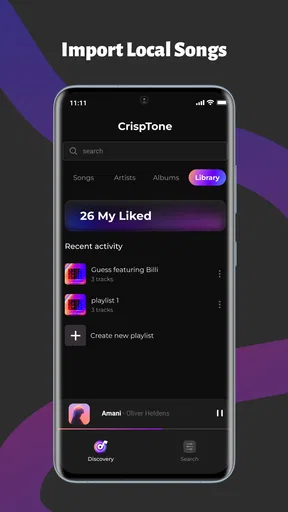
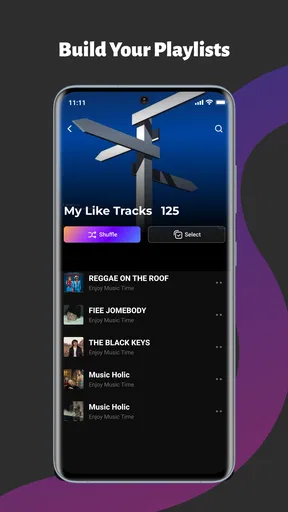
A basic file browser can play a track, but it becomes awkward once a collection grows. CrispTone’s playlist support gives me a more practical way to group music by activity rather than by storage location. I would use one list for a morning walk, another for long trips, and a separate one for albums I am currently exploring.
There is a small but important workflow advantage here. Local files are often scattered across folders after transfers, downloads, or device changes. A playlist can preserve the listening order I actually want without forcing me to move files around in storage. That is especially helpful when I mix tracks from different albums or artists into one routine.
I would still recommend starting with a little organization before building many playlists. Consistent file names and sensible folders make the library easier to understand, while playlists are best used for personal listening contexts. If the underlying collection is chaotic, no player can completely remove that friction.
Equalizer controls make the app more personal
The equalizer is one of the reasons I would pick this over a very basic offline player. Headphones, car speakers, small Bluetooth speakers, and phone speakers all present music differently. A little adjustment can make vocals easier to follow, soften an overly sharp high end, or give a thin recording more weight.
My advice is to make small changes rather than immediately pushing every control to an extreme. Strong boosts can make one song sound exciting and the next one harsh or muddy. A better approach is to adjust while listening to a familiar track, then test the result on something with a different mix. The goal is not simply more bass; it is a sound that remains comfortable across the music you actually play.
This is also where expectations need to stay realistic. Equalizer controls can shape playback, but they cannot repair a badly recorded file or turn ordinary phone speakers into a full sound system. I see the feature as a useful finishing tool, not a replacement for good headphones or well-mastered audio.
Background controls fit normal phone habits
Background playback is essential for a music app I can use throughout the day. I want to lock the screen, switch to a message, or check a map without stopping the track. CrispTone is designed around that kind of listening, and its background controls make it feel more like a proper player than an audio file opened from a file manager.
A realistic example would be preparing for a walk. I can select a playlist before leaving, start playback, put the phone away, and keep moving without keeping the music screen open. If I need to pause for traffic or skip a track, the controls are more convenient than reopening a file through storage folders.
This matters even more when battery and data usage are concerns. Playing local files avoids the constant network activity associated with streaming, although the phone still uses power for playback, Bluetooth, and the screen if it remains active. The benefit is not unlimited battery life; it is a simpler listening path with fewer network dependencies.
What the current release tells me about its direction
Version 1.0.6 feels like a young product rather than a mature all-purpose audio platform. That is not automatically negative. A focused first release can be easier to understand than an overloaded app, and the current feature set stays close to the central job: find local music, organize it, shape the sound, and keep it playing in the background.
The release date of May 18, 2026 gives the app a relatively recent starting point. I would treat the current version as a foundation and judge it by how reliably it handles the basics before expecting a long list of specialist tools. For me, dependable scanning, stable playback, responsive controls, and predictable playlist behavior matter more than decorative extras.
Existing users should therefore approach updates with a practical mindset. The important question is whether each new version improves the everyday listening flow, not whether it adds features simply to make the app look larger. Since the product is still early in its life, its future value will depend on careful refinement rather than on moving away from its offline identity.
Where it compares well with common alternatives
Compared with a streaming service, CrispTone is much better when I want to play music I already have without searching a catalog or relying on an internet connection. It is also less useful when I want discovery, synchronized libraries across devices, or instant access to albums I do not own locally. Those are not small differences; they describe two different listening models.
Compared with the default music player on a phone, the combination of playlists, equalizer controls, and background handling gives CrispTone a more intentional feel. A built-in player may be perfectly adequate for occasional playback, especially if the phone already sorts local files well. I would move to CrispTone when I want more control over how I group music and how it sounds.
Compared with advanced enthusiast players, it may appeal more to someone who wants a clean, approachable experience than to a listener who needs deep library management. A specialist player can be the better choice for unusual audio formats, highly detailed tagging, complex playback rules, or extensive customization. I would not choose CrispTone solely because I want every possible technical setting.
Small workflows that make a real difference
One useful habit is to create playlists around transitions in your day instead of only around genres. A “short walk” list, a “quiet work” list, and a “long journey” list are often faster to use than browsing by artist when you are already busy. This takes advantage of the app’s local nature: the playlist reflects your routine, not an online recommendation system.
A second tip is to test the equalizer with both headphones and the car or speaker you use most. A setting that sounds balanced through headphones may become boomy elsewhere. I would keep one conservative profile as a starting point and adjust only when a particular listening setup needs it. That avoids spending more time tuning than listening.
A third workflow is to prepare offline listening before leaving home. Check that the files you expect to use are already visible in the library, then start the playlist while you still have time to correct a missing track or an unexpected folder. This is more reliable than discovering a problem after boarding a flight or entering an area with weak coverage.
There is also a useful distinction between playlists and file storage. I would avoid treating a playlist as a backup. If a file is renamed, moved, or deleted outside the app, the listening arrangement may no longer behave as expected. Keeping the music collection stable and using playlists as a layer of organization gives a more dependable result.
Who should use it, and who should skip it
I think CrispTone is a good fit for listeners who maintain their own audio files, travel often, prefer offline playback, or want a straightforward alternative to subscription-based music services. It is also a sensible option for someone who finds the phone’s default player too limited but does not want a complicated audiophile tool.
It is less suitable for anyone whose main habit is discovering new music through recommendations. If your collection lives mostly in the cloud, or if you expect automatic synchronization between several devices, a streaming or cloud-focused service will probably feel more natural. The same applies if you need a large set of professional library features rather than a focused everyday player.
I would also pause before recommending it to a listener with a very specialized audio setup. The equalizer is helpful, but the app’s appeal is its balance of simplicity and control. People who need advanced tagging, unusual format support, detailed replay analysis, or elaborate automation should compare it with a more technical alternative before moving their whole library.
Questions I would consider before installing
Does it require an internet connection to listen? Its central purpose is local, offline playback, so the sensible setup is to have your files on the device before listening away from a network. I would still prepare playlists and verify the library in advance rather than assuming every file will appear exactly as expected after a transfer.
Can it replace a streaming subscription? Only if your listening is already based on music you own or have stored locally. It cannot offer the same kind of online catalog and discovery experience. For me, it works best alongside a streaming service or as a complete replacement only for people whose personal collection covers most of their needs.
Is the equalizer worth using? Yes, when your headphones or speakers have a noticeable tonal imbalance, or when you want a more comfortable sound for a particular type of music. I would use it gently and check several tracks before settling on a setting. The feature adds value, but it is not a reason to ignore the quality of the original recording.
Will it suit an older phone? The minimum requirement of Android 8.0 makes it relevant to devices that are not new, and the free price lowers the barrier to trying it. Still, the smoothness of scanning and background playback can vary with storage size, the number of files, and the phone’s own resource limits. I would begin with a manageable library and see how the device responds.
What should current users watch as the app develops? I would pay attention to improvements that protect the core experience: faster and clearer library organization, dependable playlists after files move, stable background playback, and equalizer behavior that remains predictable. New features are welcome, but they should not make a simple offline player harder to use.
My final view after using the app
CrispTone: Offline Music earns its place by concentrating on a need that many larger music platforms overlook: playing personal files without turning the experience into a full online ecosystem. I like the combination of local playback, playlists, sound adjustment, and background controls because each feature supports the same basic routine rather than pulling the app in unrelated directions.
The limitations are equally clear. It is not the right tool for discovery-first listening, cloud synchronization, or highly technical library management. The current release also feels like a starting point, so I would keep an eye on how Technology Hub Pro handles refinement as the app matures. The best reason to install it is not the promise of replacing every music service, but the dependable simplicity of listening to music you already have.
For my own recommendation, I would suggest trying it if your phone contains a real collection of albums, mixes, recordings, or downloaded tracks and your current player feels too bare. Set up a couple of practical playlists, keep the equalizer restrained, and test background playback during a normal day. If that workflow matches how you listen, this free app is an easy choice; if your music life is mostly online, a streaming-focused alternative will serve you better.
Pros
- Works without an internet connection once songs are stored locally.
- Simple interface makes browsing your offline library quick and easy.
- No account is required to start playing downloaded music.
- Uses little mobile data during everyday listening.
- Reliable playback in areas with weak or no network coverage.
Cons
- You must provide your own music files; it does not include a streaming catalog.
- Storage space can fill quickly when keeping many high-quality tracks offline.
- Music discovery and recommendation features are very limited.
- Playback may depend on the audio formats supported by your device.
- Some advanced features may require a paid upgrade or contain ads.
FAQs for CrispTone: Offline Music
What is CrispTone: Offline Music, and how does it work?
CrispTone: Offline Music is designed for listening to music without relying on a continuous internet connection. After adding or downloading supported audio files to your device, you can browse your collection, organize tracks, and play them offline. The exact features may depend on the app version and operating system, so users should review the store listing for supported formats and importing options before downloading.
Can I use CrispTone: Offline Music without mobile data or Wi-Fi?
Yes, offline playback is the main reason to use CrispTone: Offline Music. Once your music has been stored locally on the device, playback should not require mobile data or Wi-Fi, which is useful during flights, commutes, or in areas with weak coverage. Keep in mind that downloading, importing, syncing, or accessing online services may still require an internet connection.
Does CrispTone: Offline Music include songs, or do I need to provide my own music?
CrispTone: Offline Music should be viewed primarily as an offline player rather than a guaranteed source of free music. In most cases, you will need to provide legally obtained audio files or transfer music already stored on your device. The app may not include a built-in catalog of commercial songs, and availability of importing tools can vary between Android and iOS versions.
What audio formats and playback features does CrispTone: Offline Music support?
Support for audio formats, playlists, album artwork, repeat modes, shuffle, background playback, lock-screen controls, and equalizer settings can vary by version and platform. Before installing, check the current store description and permissions to confirm that your preferred files are compatible. If you have a large or mixed-format library, testing a few tracks first is a sensible way to avoid playback surprises.
Is CrispTone: Offline Music free, and are there advertisements or in-app purchases?
The cost of CrispTone: Offline Music depends on the version available in your region. Some editions may be free with advertising, while others can offer paid upgrades or in-app purchases for additional features. Review the official Google Play or App Store listing before downloading to see the current price, subscription details, advertising policy, and whether any premium tools are required for the listening experience you want.


